
Snapisode: Short Drama & TV
Minh Tam NguyenEntertainment
0.00.00 Reviews
- Version
- 1.0.5
- Installs
- 50.00K
- Age Rating
- Teen
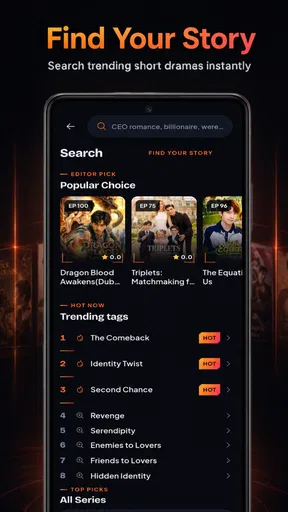
Screenshots
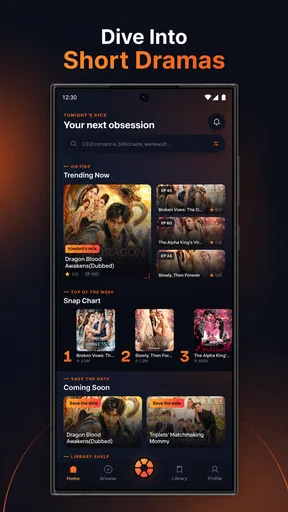
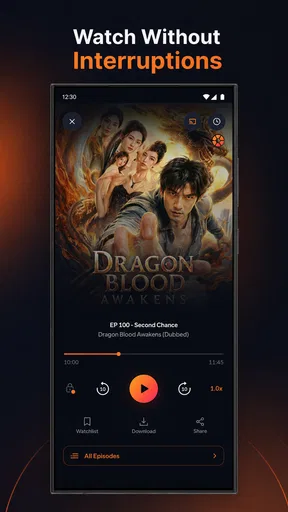
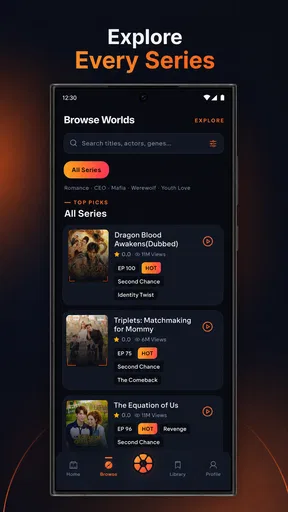
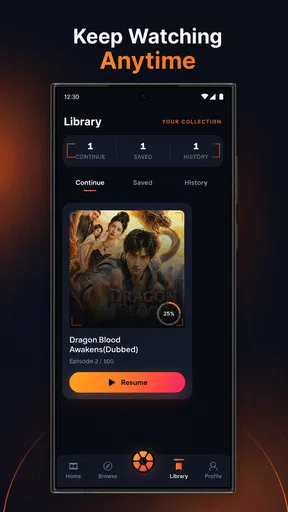
Our Review of Snapisode: Short Drama & TV
 Analysis by Appyee
I tried Snapisode as a quick entertainment app built around one clear idea: short dramas and series that move vertically, with the next episode ready through a swipe. That single choice changes the way I watch. Instead of opening a traditional television service, searching through a long catalogue, choosing a season, and settling in for a full episode, I can treat each story like a small stream of scenes during spare minutes.
That makes it an interesting fit for people who enjoy serialized drama but rarely have the time or patience for a conventional television session. I found the experience closer to browsing short-form video than to using a standard streaming service, although the continuing story gives it more structure than an endless social feed. It is free, aimed at a Teen audience, and developed by Minh Tam Nguyen, so the basic appeal is easy to understand: open the app, start watching, and keep moving through the story with a simple gesture.
My opinion is positive but specific. The vertical format is not just a different screen shape; it encourages a different viewing habit. It makes Snapisode useful for short breaks, waiting rooms, public transport, or a few minutes before bed. It is less convincing for someone who wants carefully organized television libraries, long episodes, or a relaxed large-screen viewing experience.
Why the swipe-to-next-episode idea matters
The most important capability here is the transition between episodes. Snapisode is designed so that a vertical swipe can autoplay the next part of a series almost immediately. In practice, that removes one of the small decisions that often interrupts casual viewing: stopping to find the next episode.
That sounds minor until I compare it with my normal streaming routine. On a traditional service, I may need to leave the player, locate the show again, select the next episode, wait for the interface to respond, and then resume. Those steps are fine when I am watching a long program intentionally, but they feel surprisingly heavy when I only have a few minutes. Snapisode turns the episode list into something I move through with my thumb.
The effect is a faster rhythm. I am not choosing every item from a menu; I am allowing the story to carry me forward. That can be satisfying when the current episode ends at a tense moment. The next swipe feels like a natural continuation rather than an administrative task. The strongest part of Snapisode is the reduction of friction between one short chapter and the next.
There is also a useful psychological difference. A conventional streaming app asks me to decide how much I want to watch before I begin. A vertical short-drama app lets me begin with a much smaller commitment. I can watch one segment while waiting for something, then decide whether to continue. That makes serialized fiction feel more approachable for people who avoid starting a show because its episodes appear too demanding.
The trade-off is that this convenience can make stopping harder. A swipe is so easy that I may continue beyond the time I originally intended. The same design that helps me use a spare moment can encourage an unplanned chain of episodes. I would recommend deciding in advance whether I am watching one chapter or taking a longer break, especially when the story uses cliffhangers to pull me forward.
How the vertical format feels during real use
Using the app in portrait orientation makes sense for one-handed viewing. I can hold the phone naturally and move to the next episode without changing grip or reaching for a small control. That is particularly convenient when I am standing, carrying a bag, or watching briefly at a desk between tasks.
The format also keeps the focus narrow. A traditional streaming screen often surrounds the player with episode details, recommendations, menus, and other choices. Snapisode’s central action is simpler: watch the current vertical story, then swipe when I am ready. I found that helpful when I wanted entertainment without browsing through a large collection.
Still, portrait video is not automatically better for every drama. A close-up conversation can work well, but scenes with several characters, wide locations, or visual details may feel restricted by the tall frame. I would choose this style for quick narrative momentum rather than for impressive cinematography. If a story depends on expansive scenery or carefully composed group scenes, a conventional landscape player is likely to show more of what matters.
The short format also changes how performances land. A scene has less room to develop slowly, so the app is best suited to viewers who enjoy direct storytelling and frequent turning points. I personally found the format easy to sample, but I would not replace a full-length drama service with it. Snapisode works as a different kind of viewing, not as a complete substitute for television.
What happens when I watch in short sessions
My most useful way to approach the app is to treat it as a collection of small viewing windows rather than one long appointment. For example, I might open it while waiting for a friend, watch a chapter, and swipe once more if I still have time. The absence of a long setup process makes that practical.
That workflow is especially good for people who like stories but often abandon them because they cannot remember where they left off. A swipe-based sequence gives the session a clear forward direction. I do not need to plan a full evening around the show. I can return whenever I have another short pause and continue with the next part.
There is a subtle downside to this approach: short sessions can fragment attention. If I watch in noisy surroundings or keep switching between tasks, I may follow the plot without absorbing the mood of the scene. For that reason, I get more from Snapisode when I reserve even a few uninterrupted minutes instead of treating every episode as background noise.
Another practical tip is to stop at a natural point rather than swiping automatically after every ending. Some users will enjoy the momentum, but pausing gives me a chance to decide whether I actually want more. This small habit keeps the app’s autoplay-oriented design useful without letting it dictate the length of the session.
The best everyday scenario for Snapisode
The clearest use case is a commuter or student with scattered free time. Imagine waiting for a bus, sitting in a café before an appointment, or taking a short break between classes. A full television episode may be too much, while scrolling through unrelated clips can feel empty. Snapisode sits in the middle: I get a continuing story, but the commitment is divided into small pieces.
I also think it suits someone who shares a home with other people and cannot control the television. Watching vertically on a phone is private and flexible. There is no need to occupy a living-room screen or negotiate what everyone else wants to watch. The app turns a personal device into a small drama channel that I can pick up and put down.
It can be useful for discovering whether serialized short drama is my kind of entertainment. Instead of committing to a large subscription catalogue, I can sample the format through a free app and see whether the quick pacing works for me. That low barrier is one of the reasons I would suggest trying it to a friend who likes dramatic clips but has not explored short-form series.
My advice for this scenario is to use headphones when the surroundings are busy and to watch with the phone held steadily in portrait mode. The app’s central advantage depends on keeping the visual flow comfortable. If I am constantly rotating the phone, searching for controls, or losing track of the action, the simplicity of the swipe model matters much less.
Where it falls short compared with regular streaming
Snapisode is not the right choice when I want a broad entertainment library with many viewing formats. Traditional streaming services are generally better for selecting a specific film, revisiting a favorite season, comparing episodes, or watching on a larger screen. Their interfaces may involve more steps, but those steps provide control that a swipe-first design intentionally reduces.
I would also skip it when I want a slow, immersive evening. The vertical presentation and short-episode rhythm encourage quick consumption. They are excellent for a spare moment but less suited to settling into a long cinematic experience. Someone who values detailed episode information, deliberate browsing, or a carefully planned watchlist may find the app’s directness limiting.
Another trade-off is attention. Because each swipe can lead straight into another chapter, the app can become more absorbing than expected. That is convenient when I want to keep watching, but inconvenient when I need to protect a short break from expanding into a much longer one. I see this as a design consequence rather than a flaw, yet it is worth considering before making the app part of a nightly routine.
The Teen content rating also gives me a useful boundary when deciding who should use it. I would not hand it to a young child as a general-purpose video app. For teenagers and adults who enjoy short dramatic stories, the rating is less of an obstacle, but parents should still make their own judgment about whether the format and individual stories suit their household.
Small habits that make the experience better
First, I would start with a clear time limit. Since the next episode is reached by a quick gesture, the app is built for continuation. A timer or a simple decision such as “one story break” helps me enjoy the convenience without drifting into an accidental marathon.
Second, I would use the app when the phone is already the natural screen. It makes sense during a commute or a short wait, but less sense when I have a television available and want a shared viewing experience. Choosing the right context prevents me from judging the portrait format against a job it was never meant to perform.
Third, I would pay attention to how well I follow the story in fragmented sessions. If I notice that I am swiping mainly out of habit, I would pause and return later. The app’s strength is easy continuation, but meaningful viewing still benefits from a little attention. This is particularly important for anyone who normally watches videos while multitasking.
Finally, I would keep the app as a companion to, not a replacement for, regular streaming. That combination works better for me than forcing one service to cover every mood. Snapisode handles quick dramatic breaks, while a conventional platform remains more suitable for longer programs, broader discovery, and deliberate selection.
Device support and the practical entry point
Snapisode supports Android devices running version 7.0 or later, which makes it accessible on a wide range of compatible phones. I appreciate that the basic entry point is straightforward: it is a free entertainment app rather than a service that requires a paid commitment before I can decide whether the format suits me.
The current version is 1.0.5, and the app has reached over 50 thousand installs. Those details suggest that it is an early, focused product rather than a mature replacement for the biggest streaming platforms. I would approach it with the expectations appropriate for a specialized short-drama viewer: try the central experience first, then decide whether its style fits my habits.
For iPhone users, the important question is whether this particular app is available on the device they plan to use, but I would not assume that an Android-focused experience translates perfectly to every platform. On Android, the stated minimum requirement is clear. In either case, the deciding factor is less about raw device power and more about whether I enjoy portrait viewing and swipe-led navigation.
Who gets the most value from it
I would recommend Snapisode most strongly to people who like serialized drama but have irregular schedules. It is a good match for someone who wants a story to continue across small breaks, prefers one-handed phone use, and dislikes repeatedly navigating menus to find the next episode.
It is also a sensible choice for viewers who want to experiment with short-form fiction without paying first. The free price makes sampling easy, while the Teen rating gives adults and older teenagers a general sense of the intended audience. I can imagine recommending it to a friend who spends time scrolling through short videos but wants something with more narrative continuity.
I would be more cautious about recommending it to film enthusiasts, families looking for a shared television app, or viewers who need extensive controls over how they browse. Those users may be happier with a traditional streaming service. The same streamlined flow that helps casual viewing can feel restrictive when I want to choose carefully, compare options, or watch on a wide display.
My final view is that Snapisode: Short Drama & TV succeeds because it commits to one viewing behavior instead of trying to imitate every entertainment platform. The swipe-to-next-episode flow makes short dramatic stories easy to enter and unusually easy to continue. That is genuinely useful during fragmented parts of the day, but it also demands self-control and cannot replace the range or immersion of standard streaming.
If I wanted a quick story on my phone, I would keep it in mind. I would open it for a commute, a waiting period, or a short personal break, and I would stop when the break ended rather than letting the next swipe make the decision for me. For the right viewer, that balance makes the app a convenient little drama companion; for everyone else, the usual streaming alternatives will probably offer a better sense of control and a more complete viewing experience.
Verdict
Strengths of Snapisode: Short Drama & TV
- Episodes are short, making them easy to watch during quick breaks.
- The vertical format feels natural on mobile screens.
- Frequent story twists help keep the viewing experience engaging.
- A broad selection of dramas offers different genres and moods.
- New content can give regular viewers a reason to return.
Limitations of Snapisode: Short Drama & TV
- Many episodes may require coins or in-app purchases to continue.
- The free viewing options can be limited compared with the full catalog.
- Stories may rely heavily on cliffhangers and familiar drama tropes.
- Video streaming can consume significant mobile data without Wi-Fi.
- Some content may feel rushed because of the very short episode format.
Other Releases by Minh Tam Nguyen
View All
Velvet Drama: Short Dramas
Entertainment3.8
Similar Picks in This Category
View All
Google Play Games
Google LLC3.9

Netflix
Netflix, Inc.4.8

YouTube Kids
Google LLC4.2

Disney+
Disney4.4

Prime Video
Amazon Mobile LLC4.7

Steam
Valve Corporation3.2
Frequently Asked Questions
What is Snapisode: Short Drama & TV?
Snapisode: Short Drama & TV is a mobile streaming app focused on short-form dramatic series and episodic television-style content. Episodes are designed to be watched in brief sessions, making the app suitable for users who enjoy romance, suspense, family conflict, and other serialized stories without committing to a full-length movie or traditional TV episode.
Is Snapisode: Short Drama & TV free to download and use?
The app may be available to download at no initial cost, but access to all episodes or premium story content can depend on the app’s monetization model. Some titles may include advertisements, in-app purchases, coins, subscriptions, or unlock requirements. Before watching extensively, check the current store listing and the in-app payment details, especially if multiple episodes require separate purchases.
Does Snapisode require an internet connection?
Snapisode is primarily intended for online streaming, so a stable Wi-Fi or mobile data connection is generally needed to browse the catalog and play episodes. Availability of offline viewing can vary by version, region, and subscription status. If you plan to watch while traveling, review the download options inside the app and remember that streaming over mobile data may consume a significant amount of data.
What type of content can users expect on Snapisode?
The app is aimed at viewers who prefer fast-paced, serialized short dramas rather than long traditional television episodes. Its catalog may include relationship stories, emotional confrontations, mysteries, family issues, and cliffhanger-driven plots. Content suitability can differ between series, so users should check descriptions, ratings, warnings, and age guidance before allowing younger viewers to use the application.
Is Snapisode suitable for all devices and regions?
Snapisode’s availability and feature set can differ depending on whether you use Android or iOS, your device specifications, and the country associated with your app-store account. Older phones may experience slower loading or reduced performance, while some shows or payment options may be region-restricted. Check the official store page for compatibility, supported operating-system versions, and local availability before downloading.
